 ..
..The Agent Assembly Line
Original Source of the blog post: The Agent Assembly Line
Blog was written with my colleagues from Loka: Mario Petkoski & Zafir Stojanovski
Every team building with LLMs hits the same wall. The demo works in a notebook. Then you spend three months wiring up config loading, session persistence, streaming APIs, guardrails, evaluation, and deployment before a single user touches it.
We kept hitting that wall across projects. So we built an internal template that standardizes the 80% of agent infrastructure that never changes, so each new agent becomes YAML + prompt + tools + eval instead of a bespoke integration project.
Our stack:
- Strands Agents: runtime
- Amazon Bedrock: model provider
- FastAPI / Amazon Bedrock AgentCore: service layer
This post walks through the design decisions, what we automated, and the lessons we learned along the way.
The Problem Is Never the Agent Logic
Building the agent itself, picking the model, writing the prompt, connecting some tools, that part takes a day. What takes months is everything around it. Config schemas that don’t drift between environments. Prompt loading that supports templating without becoming its own framework. Tool wiring that handles MCP servers, catalog tools, and custom Python tools in a single pass. Session persistence that works the same locally and in production. A streaming API that surfaces tool activity, not just tokens.
And then there’s the layer nobody wants to build but everyone needs: guardrails you can actually observe, not just toggle. An evaluation harness that catches when a prompt tweak quietly breaks something downstream. Async execution that keeps requests non-blocking so users aren’t staring at a spinner while the model reasons and tools run. A stateless API with pluggable session backends so you can scale horizontally without rewriting agent logic. A deployment path that doesn’t live in a 40 step wiki. We solved all of this by turning it into a template. The infrastructure is fixed, and you just bring the domain knowledge.
How We Structured It
To keep things concrete, we’ll use the first agent we built with the template: an AWS documentation assistant. It answers questions about AWS services by calling an AWS Documentation MCP server. The use case is boring on purpose, but it keeps the focus on the infrastructure patterns rather than the agent’s domain logic.
Here’s how the pieces fit together:
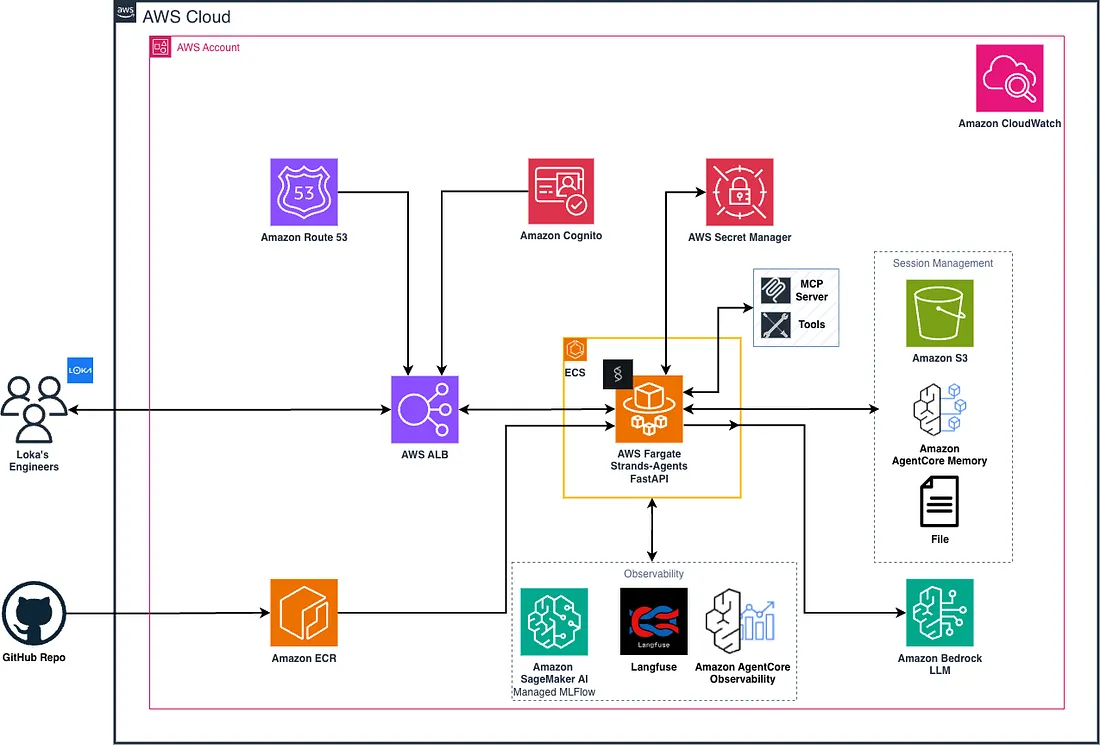
Architectural Diagram for Deploying Strands Agents with Amazon Bedrock on AWS
And the delivery loop for each new use case:

Standardized Agent Delivery Loop
The template already provides the service surface, hardening, evaluation, and deployment layers. Each new agent is mostly: write a config, write a prompt, pick your tools.
Agents Are Config, Not Code
The most impactful design decision was making agent definition purely declarative. Every agent is described by two files: a YAML config and a prompt file. No subclassing, no framework boilerplate. Here’s a trimmed version of what an agent config looks like:
name: "aws_documentation_agent"
description: "An agent that helps users find information in AWS documentation."
model_configuration:
  model_id: "amazon.nova-2-lite-v1:0"
  temperature: 0.4
  max_tokens: 8192
session_manager_configuration:
  type: "s3"
  agent_prefix: "aws_documentation"
mcp_server_configuration:
  - type_server: "stdio"
    command: "uvx"
    args: ["awslabs.aws-documentation-mcp-server@latest"]
tool_configuration:
  - type: "strands-agents-tool"
    name: "http_request"
  - type: "self-created-tool"
    name: "custom_documentation"
  - type: "self-created-tool"
    name: "execute_python"
The matching prompt file is intentionally tiny:
<instruction>
You are an AWS documentation specialist. Your job is to provide accurate, sourced answers about AWS services, APIs, and best practices by consulting official documentation.
## Tool Usage
- **AWS Documentation MCP tools**: Primary source for all AWS questions. Always search or fetch official docs before answering.
- **http_request**: Use to fetch supplementary content (e.g., AWS blog posts, GitHub examples) when official docs are insufficient.
- **execute_python**: Use to validate code or demonstrate SDK usage. Always show code and output together.
## Response Guidelines
1. **Ground answers in documentation.** Cite the official doc URL or section. If you can't find a source, say so explicitly.
2. **Be precise about service, region, and API version** when these affect the answer.
3. **Prefer concise, structured answers.** Use bullets for procedures, prose for concepts.
4. **Distinguish configuration from best practice** when they differ.
5. **Acknowledge limits.** Direct billing or service health questions to AWS Support or the Health Dashboard.
## Behavior
- Do not fabricate API parameters, ARN formats, IAM policy syntax, or service limits.
- When a user provides code or config, identify the specific AWS API or resource type before diagnosing.
- If a question is ambiguous, ask one clarifying question before diving in.
</instruction>
This minimalism is deliberate. We found that starting with a small prompt and adding tools and constraints first leads to more predictable agents than front-loading prompt complexity. Evaluation catches the moment when “more prompt” starts creating more bugs than it solves.
The config loader supports environment variable expansion and per-environment overrides (dev/, prod/ directories) so the same agent definition works across environments without code changes. Prompts support Jinja2 templating when you need it, but the default path is just a plain text file.
Tools as a Composition System
Tool integration churn is one of the biggest time sinks in agent projects. Every new capability means new wiring code, new error handling, new plumbing.
We solved this by treating tools as a pluggable composition system with three sources that merge into a single tool list at runtime:
- MCP server tools: Any MCP-compatible server, connected via config. Swapping tool providers requires zero code changes. Example: AWS Documentation MCP Server. This MCP server provides tools to access AWS documentation, search for content, and get recommendations.
- Strands catalog tools: Pre-built tools from the Strands ecosystem, developed by the community.
Example:
http_requesttool for API calls, fetching web data, and sending data to external services. - Custom Python tools: Domain-specific tools we write ourselves. Example: a Python function.
All three are declared in YAML and composed at startup. The runtime iterates through MCP clients, loads catalog modules, imports custom tools, and hands the merged list to the Strands Agent. The key insight: you can swap tool sources, build per-environment tool inventories, and observe tool usage during streaming, and all without touching runtime code. This is what makes it an “assembly line.” Adding a new capability to an agent is a YAML change, not a pull request into the agent runtime.
One interesting addition worth noting: AgentCore Code Interpreter. It gives agents the ability to execute arbitrary Python in a secure, managed sandbox. This enables on-the-fly calculations, data analysis, or generating visualizations mid-conversation. Because it ships as part of strands-agents-tools, it fits right into the same composition system. By just adding this to YAML, the agent can now write and run code without any changes to the runtime.
A Real API Surface, Not Just a Script
We wrapped the agent in a FastAPI service layer that stays intentionally thin. FastAPI provides a consistent transport boundary for request validation, SSE streaming, response shaping, and operational endpoints, while agent orchestration, tool execution, and memory behavior remain in the runtime layer.
Because the /invocations interface is stable, the same request and streaming response model works across all deployment modes: local development, a standard deployed FastAPI service, and a Bedrock AgentCore Runtime deployment that forwards calls to the same endpoint. This keeps behavior consistent across local, self-managed, and managed environments.
It handles five concerns:
- Streaming conversations (
POST /invocations): SSE stream with tokens, tool activity updates, guardrail events, and a final structured payload. - Structured output (
POST /chat/structured): Schema-constrained responses validated against a JSON schema the caller provides. - Session browsing (
GET /sessions): Inspect stored transcripts for debugging or UX continuity. - Agent metadata (
GET /agent): Introspect the active configuration at runtime. - Health (
GET /ping): Standard liveness probe.
The streaming design deserves a closer look. Most agent APIs stream tokens. Ours streams structured events:
data: {"type":"token","data":"Amazon S3 provides..."}
data: {"type":"tool_update","tool":{"name":"http_request","status":"running"}}
data: {"type":"tool_update","tool":{"name":"http_request","status":"success"}}
data: {"type":"final","output_text":"...","tool_calls":[...],"guardrail_events":[]}
event: end
data: {}
This turned out to be one of the highest-leverage decisions in the whole template. You can debug agent runs without tailing logs. Users see that something is happening when tools are executing. And frontends have a consistent event vocabulary to build around: tool spinners, guardrail warnings, and structured final payloads all come through the same stream.
Production Hardening We Built In From Day One
We’re not going to tell you to “add observability later”. We built these into the template because we’ve been burned by adding them as afterthoughts.
Sessions and Memory
We support three session backends, all config-driven: S3 (default for the server), local file (great for CLI and eval workflows), and AgentCore Memory (for retrieval-augmented session context). The difference is just where the data lands. A local directory structure for development, an S3 bucket for production, or a managed memory service for richer retrieval.
These backends cover short-term memory, the running conversation within a session. Context management uses a sliding window with configurable size and truncation behavior. When the window overflows, the oldest messages are trimmed automatically. For cases where you want to preserve context rather than discard it, there is also a summarizing conversation manager that condenses older messages into structured summaries instead of dropping them entirely.
Long-term memory goes a step further. Instead of replaying raw message history, it extracts durable knowledge across sessions: factual information, learned user preferences, and compressed session summaries. This means an agent can greet a returning user already knowing their portfolio focus, their preferred analysis style, or what they asked about last week, without stuffing the entire conversation history into the context window.
Guardrails with Two Modes
We wired Bedrock Guardrails through a hook system that intercepts both input and output. In detect mode, violations are surfaced as streaming events so you can monitor without blocking users. In block mode, the agent stops and returns a structured intervention payload. Both modes are observable in the SSE stream. This matters because safety behavior becomes testable and auditable, not hidden behind opaque provider errors.
Observability as a Feature Toggle
When tracing credentials are present, the template automatically initializes OTel-based tracing tagged with user ID, session ID, and agent name. No separate instrumentation project, it’s either on or off. Langfuse works today with zero code changes, just environment variables. MLflow, Amazon AgentCore Observability, or any other OTLP-compatible backend can be swapped in with minimal adjustments. All three receive the same traces, spans, and metadata once connected.
Evaluation Baked In
Agents are non-deterministic. The same prompt change that improves accuracy on one query can introduce hallucinations on another, or subtly shift behavior in ways that only surface weeks later. Without a way to measure these tradeoffs before they reach users, every change is a gamble. We built an LLM-as-a-judge evaluation harness that runs against a dataset, scores agent responses across accuracy, relevance, completeness, and clarity, and produces a JSON report we can diff across runs. It runs as a single CLI command, so there is no excuse to skip it.
But the real value is not the scoring itself, it is the iteration loop it enables. When you change a system prompt, swap a model, add a tool, or adjust a conversation manager, you re-run the eval suite and immediately see what improved, what regressed, and what broke. If a prompt revision introduces bias, if a new tool changes how the agent frames its responses, if an edge case starts producing unsafe output, it shows up as a score delta you can inspect before it ever reaches production. This turns agent development from “deploy and hope” into a measurable engineering process where every design decision is backed by evidence rather than intuition.
User Interface
We ship a single-file chat UI served directly by FastAPI. No build step, no framework. We use one HTML file that consumes the same SSE event stream our application would.

Agent Template Chat Interface (Streaming Mode)
The conversation view streams live. Tokens appear as they arrive. Tool calls surface inline as status chips showing which tool is running, when it completes, whether it succeeded or errored, attached to the assistant turn that triggered them. Guardrail events show up in the stream too, so we can watch detect-mode violations without digging through logs.
The value isn’t the UI itself. It’s that we’re watching the real agent, on real infrastructure, with real tool calls through the exact same streaming contract our consumers will use. That makes it useful for prompt iteration, debugging unexpected tool sequences, and having something to put on screen during a demo instead of curling JSON in a terminal.
Deployment: A Paved Road on AWS
We also built a CDK-based infrastructure layer that creates a complete AWS landing zone for agent services:
- Infra stack: VPC, S3 bucket, ECR repo, AgentCore Runtime, AgentCore Observability, AgentCore Memory, Secrets Manager entries, GitHub Actions OIDC role for CI.
- Compute stack: ECS Fargate behind an ALB, Route53 integration, Bedrock and bucket IAM policies.
The deployment sequence is six steps: deploy infra, push container, deploy compute, inject env vars, smoke test, establish an eval cadence. The service itself runs anywhere containers run, but having a decision-free AWS path saved us significant time on our first few deployments.
The Takeaway
The gap between “agent demo” and “agent in production” is real, but it’s not mysterious. It’s config management, API surfaces, session persistence, safety hooks, evaluation, and deployment automation. None of it is novel. All of it takes time if you build it from scratch for every project.
Our approach was to solve it once as a template, then treat each new agent as a configuration problem: YAML, a prompt file, a tool list, and an eval dataset. The runtime, the service layer, the hardening, and the deployment path stay fixed.
For multi-agent systems in this template, the best pattern is a supervisor (agent orchestrator) that delegates tasks to specialized sub-agents exposed as tools, so orchestration stays centralized while reusing the same config, memory, guardrails, and API surface.
If you’re building agent systems on AWS with Strands and Bedrock, we hope the patterns described here save you some of the months we spent figuring them out.