 ..
..Deploying Trinity-Mini-DrugProt-Think on Amazon SageMaker AI
Original Source of the blog post: Deploying Trinity-Mini-DrugProt-Think on Amazon SageMaker AI
Blog was written with my colleague from Loka: Petar Kalinovski
If you work in regulated domains (Healthcare, Life Sciences, Finance) you routinely hit constraints that break the default “just call a hosted API” approach:
- You can’t send sensitive data to a third-party endpoint.
- You need predictable costs (not per-token pricing surprises).
- You need to change the model (domain behavior, schemas, format constraints), not just prompt harder.
There’s also a bigger ecosystem dynamic: the most competitive open-weight releases have increasingly come from a small set of labs, and “who ships open weights” shapes who gets to build locally and cheaply. We chose Arcee AI’s Trinity Mini as a concrete Western open-weight test case, and DrugProt as the biomedical task.
In our main write-up we trained Trinity-Mini-DrugProt-Think: a LoRA adapter on top of Arcee Trinity Mini for DrugProt drug-protein relation extraction via RLVR. This post is the missing “last mile”: how to serve that base model + LoRA adapter as a SageMaker real-time endpoint, using the SageMaker Python SDK v3 and a standard Hugging Face PyTorch inference container.
The guiding principle is production leverage: ship a tiny adapter artifact, keep the base model immutable, and let SageMaker AI own the undifferentiated heavy lifting (instances, endpoint lifecycle, IAM, logs/metrics).
What we’re deploying
- Base model: arcee-ai/Trinity-Mini
- Fine-tune artifact: a PEFT LoRA adapter Loka/Trinity-Mini-DrugProt-Think
- Runtime: SageMaker AI’s real-time endpoint running a Hugging Face PyTorch inference DLC + TorchServe
Why LoRA here:
- The adapter is small (fast iteration, easy rollback).
- You can promote the same base model across environments (dev/stage/prod) and vary only adapters.
- You avoid “mystery merges” and can keep provenance clean.
Why SageMaker AI for this (vs “just use an API”)
- Data control: keep inference inside your AWS boundary (VPC, IAM, logs, encryption) instead of sending data to a third-party endpoint.
- Operational control: you own the container, the dependencies, the model loading path, and the request/response contract.
- Production knobs: endpoint lifecycle, scaling policies, instance selection, and CloudWatch integration are first-class.
The tradeoff is obvious: you’re now responsible for model cold starts, GPU sizing, and endpoint cost hygiene. This guide optimizes for correctness and clarity, not maximal throughput.
Knowing the pros and the cons of SageMaker AI, let’s see how to actually deploy the model!
Architecture and Inference Logic
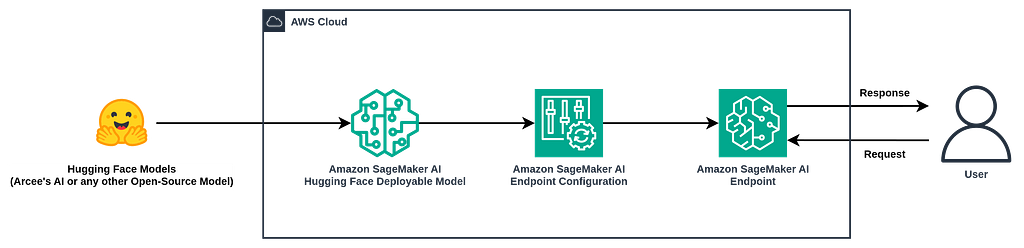
Architectural Diagram for Deployment of Arcee’s Trinity Models (or Open-Source Models) on Amazon SageMaker AI
The architecture diagram for the components needed for deploying Open-Weight models is pretty simple, because most of the painful infrastructure side is handled by SageMaker AI, especially when working with v3 of the SageMaker AI’s SDK. In the repository we share 3 important scripts that handle different things:
- serving/lora_inference/spec.py implements an SDK v3 InferenceSpec and TorchServe-compatible handler (model_fn/predict_fn).
- serving/scripts/deploy_lora_endpoint.py packages either: a local adapter directory into the model artifact under adapter/, or an empty model artifact while pointing the container at a remote adapter repo id.
- SageMaker creates/updates a real-time endpoint with the container + env vars.
What’s “v3” about it: instead of hand-assembling Model + EndpointConfig objects, we use ModelBuilder + InferenceSpec to define exactly how the container loads and serves the model, with less SageMaker boilerplate and a tighter local-to-prod story.
At runtime:
- The container downloads the base model + adapter (unless already cached on the instance volume).
- PeftModel.from_pretrained(…) attaches the adapter to the base model.
- Requests are served via transformers.generate(…).
Prerequisites
-
AWS account + credentials on the machine running the deploy script (local or CI runner).
-
A SageMaker AI execution role ARN with permissions for: SageMaker AI for model/endpoint operations (scope down in real prod), ECR pull for the inference DLC image, CloudWatch logs, and optional S3 if you later move artifacts there.
-
Service quota for your chosen instance type in your region.
-
Optional:
HF_TOKENif your base model or adapter repo is private or gated.
After these initial prerequisites, the next step is to clone the awesome repository containing all the scripts necessary for these operations:
git clone https://github.com/LokaHQ/Trinity-Mini-DrugProt-Think.git
Now you would need to install dependencies (check if you previously have uv installed):
uv sync
Then you configure the AWS credentials (if you’re running locally):
aws configure
If you prefer SageMaker AI Studio, you can run the same commands inside a Studio environment with an attached execution role (no local AWS config required). Now let’s start with the deployment!
Deploying LoRA Adapter from Hugging Face
Firsly let’s check how the deployment process works if you get the LoRA Adapter from Hugging Face repository:
- First set the execution role:
export SAGEMAKER_ROLE_ARN="arn:aws:iam::<account-id>:role/<sagemaker-execution-role>"
export HF_TOKEN="hf_xxx" # optional
- After the execution role is set, you can deploy the model by executing the script:
uv run python serving/scripts/deploy_lora_endpoint.py \
 --endpoint-name trinity-mini-drugprot-think \
 --adapter-id <org-or-user>/<adapter-repo> \
 --role-arn "$SAGEMAKER_ROLE_ARN" \
 --instance-type ml.p4d.24xlarge \
 --region us-west-2
Notes you should not skip:
- The script defaults to a us-west-2 Hugging Face DLC image URI. If you deploy to another region, pass a region-appropriate –image-uri (or keep region us-west-2)
- First deployment is dominated by cold-start downloads (base model + adapter). Plan your timeouts accordingly (– model-server-timeout).
- Instance sizing is real: Trinity Mini is a sparse MoE, but you still need to load the full checkpoint. If you try to run this on a small single-GPU instance, device_map=auto may spill to CPU and “work”, but latency will be ugly. Pick hardware based on your SLOs, not vibes.
Deploying LoRA Adapter from Local Machine/S3
If you have an adapter folder locally (containing adapter_config.json and adapter weights), you can deploy it directly:
uv run python serving/scripts/deploy_lora_endpoint.py \
 --endpoint-name trinity-mini-drugprot-think-local \
 --adapter-id ./adapter \
 --role-arn "$SAGEMAKER_ROLE_ARN" \
 --instance-type ml.p4d.24xlarge \
 --region us-west-2
If ./adapter/adapter_config.json includes base_model_name_or_path, the server can resolve the base model automatically; otherwise override with:
uv run python serving/scripts/deploy_lora_endpoint.py \
 --base-model-id arcee-ai/Trinity-Mini \
 --endpoint-name trinity-mini-drugprot-think-local \
 --adapter-id ./adapter \
 --role-arn "$SAGEMAKER_ROLE_ARN" \
 --instance-type ml.p4d.24xlarge \
 --region us-west-2
Update an existing endpoint
Let’s say you have one version of the model and you would want to update it easily with another LoRA adapter, then this will swap the model behind the same endpoint name:
uv run python serving/scripts/deploy_lora_endpoint.py \
 --endpoint-name trinity-mini-drugprot-think \
 --adapter-id <org-or-user>/<adapter-repo> \
 --role-arn "$SAGEMAKER_ROLE_ARN" \
 --update-endpoint
This is the right workflow for:
- promoting a new adapter revision,
- rolling back safely,
- keeping client integration stable.
Invoke the endpoint
To test the deployed endpoint, there is a prepared script that makes the testing inference straightforward:
uv run python serving/scripts/test_lora_endpoint.py \
 --endpoint-name trinity-mini-drugprot-think \
 --prompt "Extract the DrugProt relation type(s) from: 'Imatinib inhibits ABL1 kinase.' Return a short label." \
 --max-new-tokens 64 \
 --temperature 0.0 \
 --top-p 1.0 \
 --no-do-sample
Payload examples
This is how the request and the response for that request should look like:
- Request:
{
  "inputs": "string prompt",
  "max_new_tokens": 2048,
  "temperature": 0.7,
  "top_p": 0.95,
  "do_sample": true
}
- Response:
{
  "generated_text": "…",
  "full_text": "…",
  "model_id": "arcee-ai/Trinity-Mini",
  "adapter_id": "<adapter path or repo id>",
  "model_name": "Trinity-Mini-DrugProt-Think"
}
Operational notes
There are some important operational notes when going into full production mode:
- Latency/throughput: this implementation uses transformers.generate(…) inside TorchServe. It’s correct and simple, but not a throughput monster. If you need high QPS / high token/sec, consider a vLLM/TGI/DJL-based container and treat this endpoint as the reference implementation.
- Cold start: downloading base+adapter at container start is easy but slow. For strict SLOs, pre-package artifacts (S3 model tarball / private ECR image) so workers start hot.
- Security: if you run in a VPC with egress restricted, Hugging Face downloads will fail unless you allow outbound or pre-stage artifacts. For private adapters, HF_TOKEN must be provided via secure env/secret injection.
- Timeouts:
--model-server-timeoutcontrols both TorchServe and MMS timeouts (see SAGEMAKER_MODEL_SERVER_TIMEOUT, MMS_DEFAULT_ in the deploy script). - Dependency drift: the container runtime installs serving/lora_inference/requirements.txt (pins transformers==4.57.3, peft==0.14.0 for our Arcee Models). Keep this aligned with your training/export stack to avoid subtle adapter loading issues.
- SDK v3 footgun: serving/scripts/deploy_lora_endpoint.py includes a targeted workaround for an SDK v3 repack/upload path edge case when combining model_path + source_code. If you copy-paste the deploy script into another repo, keep that patch or validate the SDK version you’re on.
Cleanup
It is important after every experimentation with different setups to cleanup models that are still deployed behind endpoints, but are not used. That can be done using:
uv run python serving/scripts/delete_lora_endpoint.py \
 --endpoint-name trinity-mini-drugprot-think \
 --region us-west-2
Conclusion
If you’ve made it this far, you now have a clean, reproducible path from an RLVR-trained LoRA adapter to a managed production endpoint: base model stays immutable, adapters iterate quickly, and SageMaker AI owns the operational surface area (endpoint lifecycle, IAM integration, logs/metrics).
The main decisions that determine whether this feels “production-grade” are not in the Python code: they’re instance sizing, cold-start strategy (download vs pre-packaged artifacts), and whether TorchServe + transformers.generate is sufficient for your throughput/SLO. If you outgrow this reference stack, keep the same adapter/base split and move the serving layer to a higher-throughput runtime (vLLM/TGI/DJL) while preserving the request/response contract.
Production-grade ML is not about bigger models - it is about clearer boundaries, reproducible artifacts, and operational control. And yes, production is where the real fun starts.